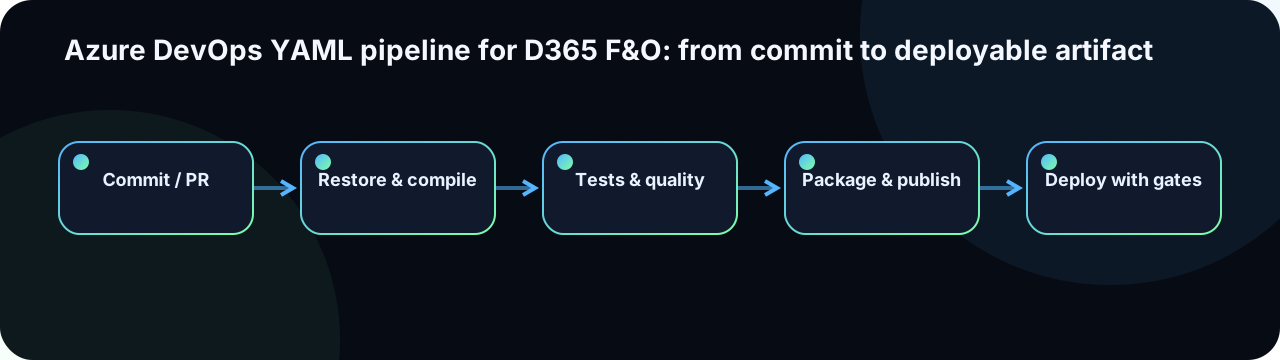
Select the correct pipeline model
The classic flow uses Finance and Operations build tooling and NuGet packages to create an LCS deployable package. The unified developer experience builds X++ using pac d365 build and produces a Power Platform unified package. See Build automation with Microsoft-hosted agents and CI/CD for the unified developer experience.
Recommended stage design
- Validate: conventions, secret detection, metadata structure and dependency graph.
- Restore: NuGet packages and build tools at pinned versions.
- Compile: X++ models, labels and SSRS reports with warnings-as-errors policy.
- Test: unit tests (SysTest) and package integrity checks.
- Package: immutable artifact generation with version stamp.
- Publish: manifest, SHA-256 checksum, logs and package to artifact feed.
- Deploy: protected promotion to each environment with pre-checks and approvals.
NuGet configuration and baseline pinning
The NuGet configuration is the single most important file for build reproducibility. A floating version reference can change compilation output between two identical source commits.
<?xml version="1.0" encoding="utf-8"?>
<configuration>
  <packageSources>
    <!-- Microsoft D365 platform feed -->
    <add key="D365-Platform"
         value="https://pkgs.dev.azure.com/{org}/{project}/_packaging/D365-Packages/nuget/v3/index.json" />
    <!-- Custom ISV / internal packages -->
    <add key="Internal"
         value="https://pkgs.dev.azure.com/{org}/{project}/_packaging/Internal/nuget/v3/index.json" />
  </packageSources>
  <packageSourceCredentials>
    <D365-Platform>
      <add key="Username" value="%NUGET_USERNAME%" />
      <add key="ClearTextPassword" value="%SYSTEM_ACCESSTOKEN%" />
    </D365-Platform>
  </packageSourceCredentials>
</configuration>
# packages.config — pin every version explicitly
Microsoft.Dynamics.AX.Platform.DevALM.BuildXpp 7.0.7279.57
Microsoft.Dynamics.AX.Application.DevALM.BuildXpp 10.0.2135.37
Microsoft.Dynamics.AX.ApplicationSuite.DevALM.BuildXpp 10.0.2135.37Store nuget.config and packages.config at repository root and commit them under version control. The baseline version must match the target environment's application version. A mismatch is caught at compile time but costs build minutes when discovered late.
Readable YAML skeleton
trigger:
  branches:
    include: [ main ]

pr:
  branches:
    include: [ main ]

variables:
- group: d365-build-non-secret
- name: artifactName
  value: d365-package
- name: baselineVersion
  value: '10.0.48'

stages:
- stage: Validate
  jobs:
  - job: Metadata
    pool:
      vmImage: windows-latest
    steps:
    - checkout: self
      clean: true
    - template: templates/validate-metadata.yml

- stage: Build
  dependsOn: Validate
  jobs:
  - job: CompileAndPackage
    pool:
      vmImage: windows-latest
    timeoutInMinutes: 120
    steps:
    - template: templates/restore-d365.yml
      parameters:
        baselineVersion: $(baselineVersion)
    - template: templates/compile-xpp.yml
    - template: templates/run-systests.yml
    - template: templates/create-package.yml
      parameters:
        artifactName: $(artifactName)
    - publish: $(Build.ArtifactStagingDirectory)
      artifact: $(artifactName)

- stage: Deploy_UAT
  dependsOn: Build
  condition: and(succeeded(), eq(variables['Build.SourceBranch'], 'refs/heads/main'))
  jobs:
  - deployment: Promote
    environment: D365-UAT
    strategy:
      runOnce:
        deploy:
          steps:
          - download: current
            artifact: $(artifactName)
          - template: templates/deploy-lcs.yml
            parameters:
              environment: UAT
              lcsProjectId: $(lcsProjectId)
Templates hide implementation detail without hiding pipeline intent. The stage names and dependencies remain readable at a glance.
Pipeline template library
Organise reusable steps in a templates/ folder committed to the same repository (or a dedicated pipeline repository shared across projects):
templates/
├── validate-metadata.yml    # Model descriptor checks, secret scan
├── restore-d365.yml         # NuGet restore with version parameter
├── compile-xpp.yml          # Invoke-D365ModuleCompile / xppc
├── run-systests.yml         # Invoke-D365ModuleTestsInAzure / test runner
├── create-package.yml       # Create-D365Deployable / generate manifest
├── deploy-lcs.yml           # Invoke-D365LcsAssetUpload + Invoke-D365LcsDeployment
└── notify-teams.yml         # Teams webhook notification on failure
Each template takes typed parameters and uses only supported Azure DevOps tasks. Keep templates idempotent: a retry of the same stage must produce the same result.
Restore and baseline
- Pin build-tool and platform package versions (see NuGet configuration above).
- Use authenticated feeds through Azure DevOps service connections, never inline credentials.
- Cache the NuGet package directory between jobs using the
Cachetask, keyed on the package manifest hash. - Fail early (stage Validate) when a required package version is not available in the feed.
- Document the baseline version in the repository root
README.mdand in the pipeline variable group.
Version models and artifacts
Application baseline : 10.0.48
Release train        : 2026.07
Build revision       : $(Build.BuildId)  → 8421
Artifact name        : QWO-D365-10.0.48-2026.07.8421.zip
Commit               : $(Build.SourceVersion) → 7c4e90a

manifest.json:
{
  "baseline":   "10.0.48",
  "release":    "2026.07",
  "buildId":    8421,
  "commit":     "7c4e90a",
  "branch":     "refs/heads/main",
  "models":     ["QwoCore", "QwoIntegration", "QwoReporting"],
  "workItems":  ["ADO-1423", "ADO-1510", "ADO-1577"],
  "sha256":     "e3b0c44298fc1c149afbf4c8996fb924...",
  "builtUtc":   "2026-07-22T18:34:00Z"
}
The manifest is stored alongside the ZIP in the artifact feed. Every downstream consumer — UAT, release manager, Microsoft support — can reconstruct the full provenance chain from the artifact name alone.
Quality gates
- Full compilation of all models in the solution, not only the changed project.
- Critical and blocking Best Practice warnings treated as errors.
- Focused SysTest suite on every build; scheduled broader regression suite.
- Secret and unexpected-binary detection in the repository (e.g.,
trufflehogor Azure Defender). - Metadata and model-dependency graph validation.
- Package-size threshold with comparison to the previous successful build.
Secrets and identities
Use Azure DevOps service connections, Key Vault-backed variable groups and protected environments. Assign identities the minimum required access to feeds, artifact stores and target environments. Mask tokens at variable-group level and never print sensitive configuration content in build logs.
# Key Vault-linked variable group example
variables:
- group: d365-keyvault-secrets  # links to Azure Key Vault

# Reference in step:
- task: NuGetAuthenticate@1
  displayName: 'Authenticate NuGet feeds'
  # Service connection configured in project settings, not inline credentials
Deployment and approvals
For classic LCS deployments, see Deploy assets by using Azure Pipelines. Unified projects use Power Platform Build Tools and unified packages.
- One Azure DevOps environment per deployment target (UAT, Pre-Prod, Prod).
- Each environment defines automated pre-checks and named approvers.
- Download by immutable artifact identifier and version — never "latest".
- Record the deployment outcome (success/rollback/abort) in a linked release work item.
Pipeline observability
Track stage duration, failure rate, recurring failure causes, restore time and artifact size trend. Gradual compile-time growth often reveals dependency expansion or undersized agents. Configure alerts for:
- Build time exceeding 150% of the rolling average.
- Test failure rate above threshold on
main. - Artifact size increase greater than 20% vs. previous release.
- Secret scan findings (immediate block).
Tech Lead checklist
- Is the YAML versioned in Git and protected by a PR policy?
- Are baseline version and NuGet dependencies explicitly pinned?
- Does every build start from a clean workspace (
clean: true)? - Is the deployable package generated exactly once and never rebuilt?
- Are the manifest and SHA-256 checksum published alongside the artifact?
- Do secrets use Key Vault-backed variable groups or service connections?
- Does each environment enforce named approvals and automated pre-checks?
- Can the full release evidence (build, tests, approvals, checksum) be reconstructed from the artifact name?